Tin Army Guide: All 10 Units and Counters
Tin Army is an auto battler: you place squads inside the blue outline, press play, and the fight runs on its own. Winning is almost entirely about picking the right units for the enemy line in front of you. This guide covers how the economy works, what every one of the 10 units actually does, and which unit beats which.
How a battle works
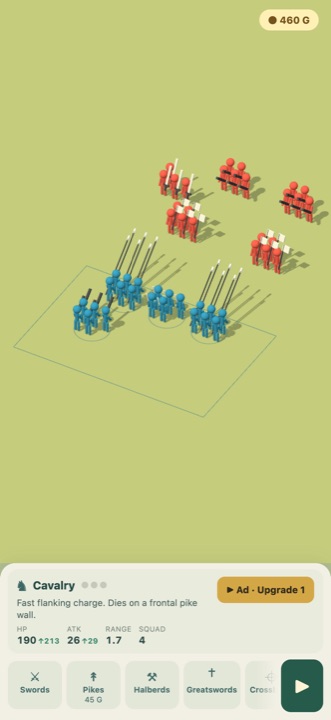
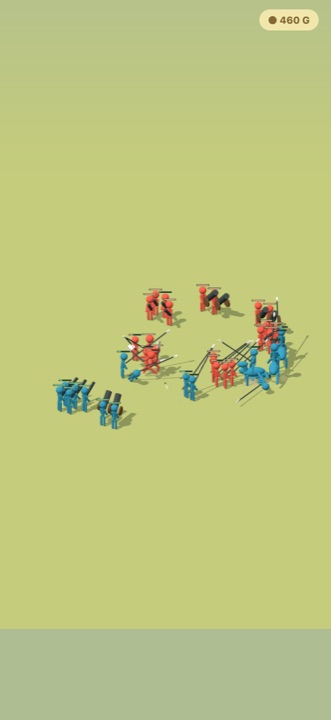
Each battlefield shows the red enemy army before the fight. Pick a unit card at the bottom, then tap inside the blue outline to place a squad. You can field up to 6 squads at once, and squads need a little space between them. Drag a placed squad to move it, or tap it to take it back off the field. Press the play button and you can only watch.
A battle ends when one side has nobody left standing. If both armies are still alive after 120 seconds, the battle is a draw. Battles marked as a strong foe are the walls and boss fights of the campaign.
Damage is rolled like dice for every hit, so the same setup can win one time and lose the next. If a matchup is close, a second try is a fair test.
Gold, squads and what you keep
You start with 120 G and two Swords squads, and in the very first battle those two are already placed for you. Gold only buys new squads. When you place a card and have no spare squad of that type, the game buys one at its price. You can own up to 6 squads of each type.
Squads you own come back for the next battle, but only if at least one soldier in the squad survived. After a win or a draw, every squad with a survivor is kept and fully healed. A defeat means your whole line fell, so every squad you placed is lost. Some of that is returned: you get 75 percent of the purchase price of every wiped squad back as salvage.
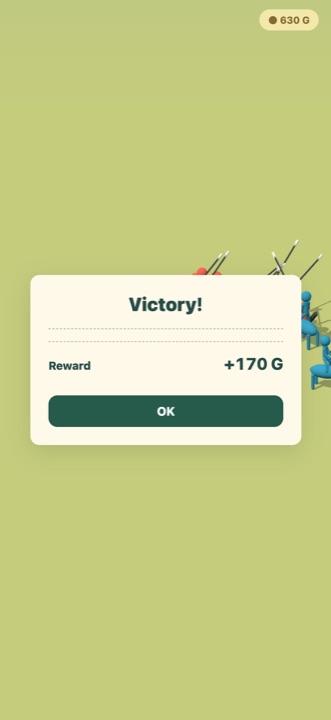
A win pays 90 G on battlefield 1, rising to 120 G from battlefield 8 onward. A loss pays 15 G to 45 G, but only if the fight lasted at least 5 seconds and you damaged an enemy. If you ever have no squads and less than 40 G, your gold is topped up to 40 G.
- Swords 20 G, Pikes 45 G, Shields 50 G, Crossbows 55 G
- Halberds 60 G, Medics 60 G, Greatswords 75 G
- Muskets 100 G, Cavalry 100 G, Cannon 180 G
All 10 unit types
A card places one soldier, except Pikes, Crossbows and Medics, which place two. Armor is the share of incoming damage a unit ignores. Muskets and Cannon ignore 90 percent of the target's armor and Halberds ignore 70 percent, so those three answer armored lines.
Melee units hit 20 percent harder when they strike an enemy from the side or the rear.
- Swords (available from the start): 110 HP, 18 percent armor, range 1.3, fast short attacks. Cheap filler that wins by getting inside a pike's reach, because Pikes deal only 30 percent damage to anyone standing right on top of them.
- Pikes (win battle 1): 85 HP, range 4.4, two soldiers per card. Deal 2.5 times damage to Cavalry. A Cavalry charge that hits a pike from the front is stopped: the rider takes 65 damage and is stunned.
- Crossbows (win battle 2): 70 HP, range 10, two per card, reload every 1.8 seconds. Faster and cheaper than Muskets but hit softer. Very weak once an enemy reaches them.
- Halberds (win battle 3): 125 HP, 28 percent armor, range 2.7, slow swings that hit up to 2 men in front. Deal 1.8 times damage to Cavalry and cut through armor.
- Muskets (win battle 4): 70 HP, no armor, range 16, very heavy shots that ignore most armor, but reload only every 3.5 seconds.
- Cavalry (win battle 4): 190 HP, 32 percent armor, the fastest unit. After running a short distance its next hit is a charge worth 2.3 times damage. Placed near the left or right edge of the outline, Cavalry rides wide around the flank before turning in.
- Greatswords (win battle 5): 130 HP, range 2, slow cleave that hits up to 3 men in front. Strong against packed infantry.
- Cannon (win battle 6): 140 HP, range 18, fires every 6.5 seconds and moves very slowly. A ball passes through up to 4 soldiers in a line and splashes the men around the first one it hits. Nearly useless in close combat.
- Shields (win battle 9): 130 HP, 28 percent armor that rises to at least 40 percent against bolts, shots and cannon balls. Weak attack. Take 1.5 times damage from Greatswords and Halberds.
- Medics (win battle 15): 85 HP, two per card, never attack. They walk to the most wounded ally nearby and heal it, plus any wounded allies standing right next to it, about once per second.
Counter cheat sheet
Each unit's info panel shows a Strong vs and a Weak vs line, and the defeat card uses the same table. Read it as: if this enemy is hurting you, bring this unit.
- Enemy Cavalry: bring Pikes
- Enemy Pikes: bring Swords
- Enemy Swords: bring Greatswords
- Enemy Greatswords: bring Crossbows
- Enemy Halberds: bring Muskets
- Enemy Crossbows: bring Cavalry (Shields also soak their bolts)
- Enemy Muskets: bring Crossbows (Shields also soak their shots)
- Enemy Cannon: bring Crossbows
- Enemy Shields: bring Greatswords
- Enemy Medics: bring Cavalry
Progress, unlocks and upgrades
There are 86 battlefields. The first eight teach the counters one at a time: battlefield 2 is two Cavalry squads that Pikes stop, battlefield 5 is the first wall with Cavalry on both wings, battlefield 7 hides Muskets and Cannon behind two Pike squads, and battlefield 8 is a mixed boss line. From battlefield 9 on, difficulty rises and falls in cycles of about six battles, with enemy squads getting extra soldiers and tougher stats at each peak.
Upgrades go up to level 3 per unit type. Each level adds one soldier to every squad of that type and raises its health by 12 percent and its damage by 10 percent. If you have played at least 3 battles, opening the game again on a later day gives you a free upgrade to spend on any unlocked unit. Gifts do not pile up, so spend it.
Tips that win battles
Read the enemy before you place anything. When you lose, the result card names the enemy that took down the most of your soldiers and suggests its counter, or an upgrade if the counter is still locked.
- Put melee in front and ranged units at the back of the outline. Crossbows, Muskets and Cannon all fall apart once something reaches them.
- Face Cavalry with Pikes head on. The stop only works from the front, so do not leave the flanks of a pike line empty.
- Against a thin front line hiding guns behind it, mass Crossbows. Several Crossbow squads out-trade Muskets and Cannon at range.
- Use Cavalry on the edges of the outline to swing around and reach enemy archers and gunners.
- Shields in front of your gunners absorb return fire, and Medics behind a tough front line keep it standing longer.
Frequently asked questions
- How many units and battlefields does Tin Army have?
- There are 10 unit types: Swords, Pikes, Crossbows, Halberds, Muskets, Cavalry, Greatswords, Cannon, Shields and Medics. The campaign has 86 battlefields.
- Why did my squads disappear after a defeat?
- A squad only stays with you if at least one of its soldiers survives. In a defeat your whole line falls, so all placed squads are lost. You get 75 percent of their purchase price back as salvage.
- What counters cavalry?
- Pikes. They deal 2.5 times damage to Cavalry, and a charge that meets a pike from the front is stopped, costing the rider 65 health. Halberds also deal 1.8 times damage to Cavalry.
- When do new units unlock?
- Pikes after battle 1, Crossbows after battle 2, Halberds after battle 3, Muskets and Cavalry after battle 4, Greatswords after battle 5, Cannon after battle 6, Shields after battle 9 and Medics after battle 15.
- What happens if nobody wins?
- If both sides still have soldiers after 120 seconds, the battle is a draw. You keep every squad that has a survivor, but you do not move on to the next battlefield.