Home › Scrap Bike › Guide
Scrap Bike Guide: Controls, Landings and All 23 Obstacles
Scrap Bike is a 2D dirt bike game with one input. You hold to ride forward, let go to slow down, and in the air the same press tilts the bike. Each level ends at a checkered flag, and finishing it opens the next. This guide covers the rules the game actually uses: throttle and air control, what counts as a crash, which obstacle appears in which levels, and how levels after 100 are made.
Controls
Press and hold anywhere on the screen to ride forward, or hold Space, the Right arrow or the Up arrow. Power builds from zero to full over a little less than half a second, which stops the bike from flipping backwards at the start. Top speed on flat ground is about 15 meters per second.
There is no brake. When you let go, a light engine brake slowly takes speed away, so let go early before anything that needs a slow approach.
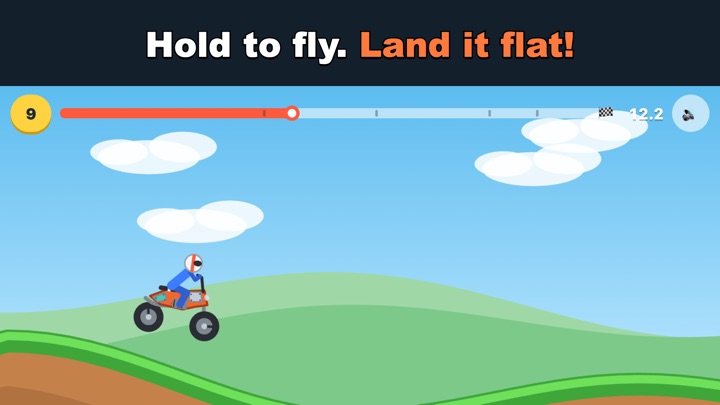
In the air, holding lifts the front wheel and letting go dips the nose, at about a third of the strength of holding. Air control only works while both wheels are off the ground, and spin speed is capped.
R restarts the level and N goes to the next one after you finish. The speaker button toggles sound, and the level number at the top left opens the level list.
Crashes, retries and the finish
A run ends in two ways. If the rider's head or body touches the ground, a ceiling or any solid object, the screen shows Wipeout! If the bike drops into a pit or far below the track, it shows Fell in! Apart from pits, the bike itself can bump into things freely: only the rider counts.
The crash card shows how far you got as a percentage. Tap anywhere to try again from the start; there are no checkpoints.
Pass the checkered flag to finish. The card shows your time to a tenth of a second, your best time, and New record! when you beat it, with Retry and Next buttons.
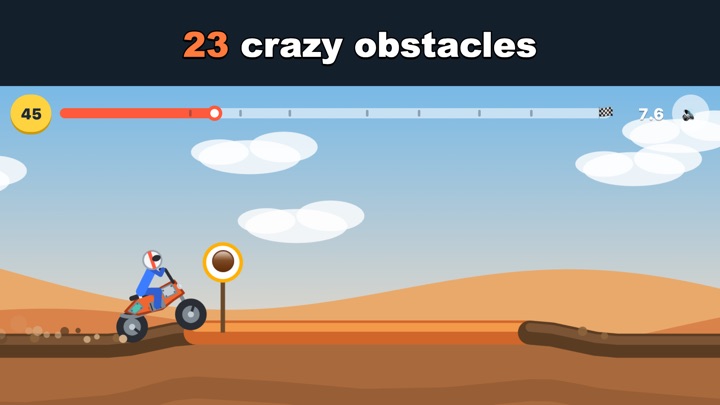
The bar along the top is the whole track: red fill for your progress, tick marks where obstacles start, and the flag at the finish. A road sign with an icon stands about 7 meters before most obstacles.
Landing flat and perfect landings
Land with both wheels together, lined up with the slope. Nose too high and the back wheel hits first and the bike can flip backwards; nose too low and it tips over the front wheel. Either way the rider's head ends the run.
If you were in the air for more than half a second and land within about 10 degrees of the ground's angle, a gold Perfect landing! appears. A jump longer than 1.1 seconds that is not perfect shows your air time, for example Air 1.4s.
Hold through the ramp to leave it fast, then tap in the air to match the slope ahead. Most landing slopes point downhill, so a slightly lowered nose is usually right.
How the 100 levels are organized
Levels 1 to 100 are fixed and the same for every player. The first 92 are built around 23 obstacles, each owning four levels in the same pattern: learn (the new obstacle, easy), adapt (the same obstacle three times, a little harder each time), apply (mixed with obstacles you already know), and reward (an easy, fast level of ramps, hills, valleys, tabletops, boosters and double jumps you have seen).
On a learn level the start card shows New with the obstacle's name and a one line tip, such as Mud: Mud grabs the wheels. Build speed first and keep holding.
Levels 93 to 100 are a final review mixing 5 or 6 different obstacles. All 100 levels were finished by a test bot, and each is tuned so the bot's run takes about 26 to 35 seconds.
Until level 9, hills and gravel are kept low so nothing throws you into the air before ramps teach air control. The scenery changes every 16 levels, cycling through six color themes.
Every obstacle and where it first appears
Each obstacle is introduced at the first level shown and owns that block of four. It can return later in apply levels and the final review.
- Hills, levels 1 to 4: rolling ground. Hold to go, let go to slow down.
- Gravel, levels 5 to 8: small fast bumps that bounce you if you go too fast.
- Ramp, levels 9 to 12: the first jump and the first lesson in air control.
- Crest, levels 13 to 16: a high hump. Too fast at the top and you fly off it.
- Valley, levels 17 to 20: a dip you climb out of with the downhill speed.
- Steep drop, levels 21 to 24: a long downhill with gravel waiting at the bottom.
- Steep climb, levels 25 to 28: needs speed before the slope starts.
- Speed bumps, levels 29 to 32: a row of sharp bumps meant to be taken slowly.
- Tabletop, levels 33 to 36: a ramp with a flat top. Clear it and land on the downslope.
- Ledge, levels 37 to 40: one to three sudden drops in a row.
- Stairs, levels 41 to 44: steps you climb slowly, one at a time.
- Mud, levels 45 to 48: drags the bike back, and the faster you go the harder it pulls.
- Booster, levels 49 to 52: an orange strip that pushes you forward while your wheels touch it, followed by a ramp.
- Gap jump, levels 53 to 56: a ramp over an open pit. Falling in ends the run.
- Crates, levels 57 to 60: light boxes you push through.
- Logs, levels 61 to 64: round logs that roll under your wheels.
- Ice, levels 65 to 68: an icy hump with almost no grip, so full throttle only spins the wheel.
- Cave, levels 69 to 72: a low ceiling over bumpy ground. Bounce up and you hit your head.
- Double jump, levels 73 to 76: two ramps back to back.
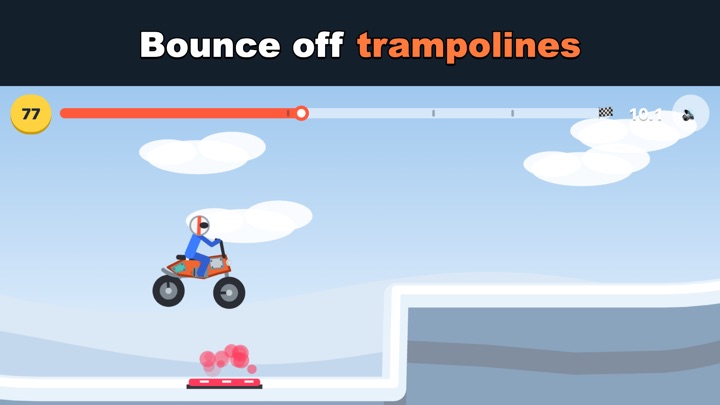
- Trampoline, levels 77 to 80: a red pad that throws the bike straight up onto a higher ledge.
- Seesaw, levels 81 to 84: a plank on a pivot that tips once you pass the middle.
- Rope bridge, levels 85 to 88: a swinging bridge of planks over a pit.
- Crumbling bridge, levels 89 to 92: each plank falls 0.3 seconds after a wheel touches it.
Tips for the hardest obstacles
Trampoline: the pad sets your forward speed to between 3 and 5 meters per second and throws the bike about 2.2 meters above the ledge after it. You only need to keep the bike level on the way down.
Booster and mud only act while the wheels are on the ground. The booster pushes until about 21 meters per second, so expect a long jump off the ramp after it. Mud pulls harder the faster you go, so enter fast and keep holding.
Crumbling bridge: every plank falls 0.3 seconds after you touch it, so cross fast and never stop. The rope bridge swings, so cross it at a steady, moderate speed.
On ice, grip is a small fraction of normal ground, so use a gentle throttle. In the cave, any bounce can put the rider's head into the ceiling.
After level 100, and saving progress
The game does not end at level 100. From level 101 on, each level is generated when you open it from 5 or 6 different obstacles, and the game keeps only a version its bot can finish in about 26 to 35 seconds. Difficulty rises until about level 133, then stays at its highest. A given level number always produces the same track.
Progress is saved in your browser on this device: your highest unlocked level, your best time on each level, and the level you were last on, which is where the game reopens. The level list shows unlocked levels with best times and locks the rest. Near level 100, the next few generated levels appear too, marked with an infinity sign.
In the browser version there are no ads and no skip button. Each level must be finished to open the next, but you can replay any unlocked level from the list.
Frequently asked questions
- How do I control the bike in the air?
- Hold to lift the front wheel and let go to dip it. Letting go turns the bike at about a third of the strength of holding, so short taps make small corrections.
- Why did I crash even though the bike landed?
- A run ends when the rider's head or body touches anything solid. A nose high or nose low landing can tip the bike and put the rider into the ground.
- Is there a brake?
- No. Letting go only applies a light engine brake. Let go early before stairs, logs, speed bumps or the seesaw.
- What counts as a perfect landing?
- You need more than half a second in the air and the bike must touch down within about 10 degrees of the ground's angle. A gold Perfect landing! message appears when you do it.
- How many levels are there?
- Levels 1 to 100 are hand tuned and the same for everyone, with a new obstacle every four levels up to level 92. After level 100, new levels keep being generated and checked by a bot, with no end.
- Can I play with a keyboard?
- Yes. Hold Space, the Right arrow or the Up arrow to ride. Press R to restart the level and N to go to the next level after you finish.