Home › Fold & Peek › Guide
Fold & Peek Guide: Folding Rules, Hints and Levels
Fold & Peek is a paper fold puzzle. You get a sheet of coloured squares and a small target picture at the top of the screen. Fold the sheet along its grid lines until it has the same size and the same colours as the target. The catch is that every square also has a colour on its back, and you only see that colour once the square is flipped over. This guide explains exactly how a fold works, how to look at the back without committing, what the buttons do, and how the 60 levels are built.
The screen and the goal
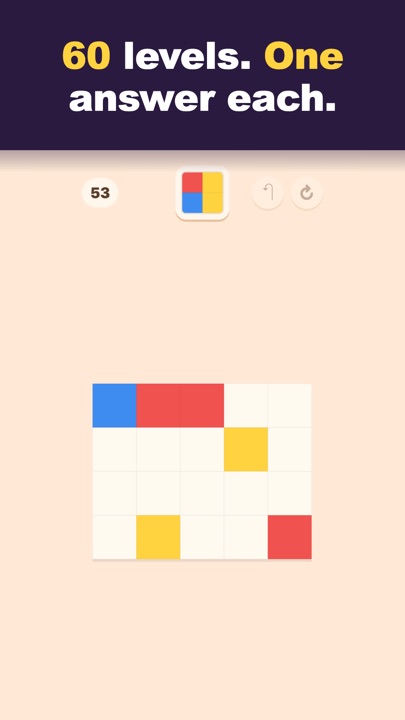
The top bar has three parts. On the left is the level number. In the middle is the target: a small picture of the finished paper. On the right are the buttons: undo (↶), restart (↻) and, from level 4, a light bulb for a hint. The sheet you fold sits in the middle of the screen.
A level is solved when your sheet is exactly as wide and as tall as the target and every square shows the same colour as the matching square in the target. Colours come from a small set: red, yellow, blue and plain white paper. White is a colour like any other. It is solid paper, not a hole, so a white square on top hides whatever is underneath it.
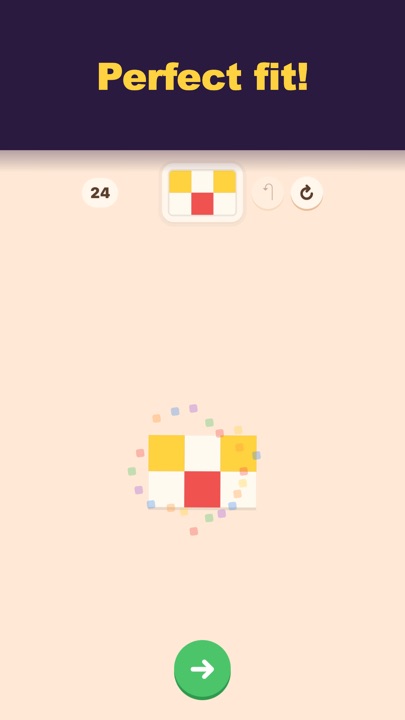
There is no timer and no move limit. When you match the target, coloured confetti bursts from the paper and a green arrow button appears at the bottom. Tap it to go to the next level.
How to fold
Put your finger on the paper and swipe left, right, up or down. The square you touch decides where the crease goes. Swipe left and the column you touched, plus every column to its right, flips over to the left, with the crease along the left edge of that column. Swipe right and the touched column plus everything to its left flips over to the right. Up and down work the same way with rows.
The game picks the direction after your finger has moved a short distance, using whichever way you moved more: sideways or up and down. You can start the swipe a little outside the paper and it still counts. If the paper is only one square wide in the direction you swipe, there is nothing to fold, and the sheet gives a small shake instead.
The flap follows your finger as you drag, so the point you grabbed stays under your fingertip. On a computer, click and drag with the mouse in the same way.
Peeking: lift without folding
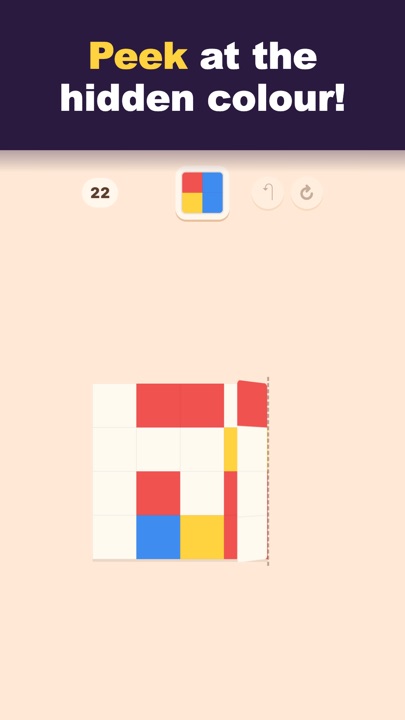
This is the core trick of the game. While you drag, the flap lifts off the sheet like a real page and swings around the crease, and you can see its back. A fold only happens if you push the flap past 120 degrees. When you cross that point you hear a small tick and the crease line darkens. Let go after that and the fold is made.
Let go before 120 degrees and the flap drops back flat. Nothing changes and the move does not count. So you can lift any part of the paper, look at the colours on its back, and put it down again as often as you like. Before you commit to a fold, peek at the part you are about to flip. The colour you see on its back is the colour that will end up on top.
If a fold would swing part of the paper off the screen, the whole board zooms out a little while you drag so you can see where the flap will land. It settles back once you let go.
How folded paper stacks
Each fold flips one part of the sheet over the crease and lays it on top of the other part. The flipped part turns upside down, so its back faces up. If that part was already several layers thick from earlier folds, the order of those layers is reversed too: what was at the bottom is now on top. You always see only the top layer of each square.
The part you flip does not have to be the smaller one. If you flip the longer part, it sticks out past the edge of the shorter part. The new size along that direction is always the size of the longer part, so every fold makes the sheet smaller by at least one row or column. The part that stays down keeps its front colours, which matters when you fold off centre.
Because of the stacking, the order of your folds matters. Folding left and then up can leave different colours on top than folding up and then left.
Wrong folds, undo and restart
A fold is wrong as soon as it makes the target impossible. That happens in two cases: the sheet becomes narrower or shorter than the target, or it reaches the target size but the colours do not match. A wrong fold shakes the paper and then opens back up by itself, so you are back where you were before that fold. You never get stuck on a dead end.
The undo button (↶) opens your last fold back out. You can keep tapping it to go back one fold at a time all the way to the flat starting sheet. The restart button (↻) puts the whole level back to the starting sheet in one go. Restart is greyed out until you have made at least one fold, and it also works after you solve a level if you want to try it again.
Hints and the 60 levels
On levels 1 to 3 a ghost finger appears by itself and shows a swipe that solves the level. It stops showing once you make your first swipe. From level 4 on there is a light bulb button instead. Tap it and the ghost finger shows the next correct fold from the paper as it is right now, so it also helps in the middle of a level. The bulb starts to wiggle if you go 40 seconds without folding, or after two wrong folds on the same level. In the browser the hint is free. In the mobile app it may play a short ad first, and if the ad cannot load you get the hint anyway.
There are 60 levels. The first 13 teach one idea at a time: folding shows the back, folding up and down, choosing which side to flip, square sheets, folding off centre, and flipping the longer part. Each level needs a fixed smallest number of folds, from 1 up to 5:
- 1 fold: 10 levels (1 to 8, 12 and 13)
- 2 folds: 13 levels, starting at level 9
- 3 folds: 13 levels, starting at level 18
- 4 folds: 14 levels, starting at level 20
- 5 folds: 10 levels, starting at level 39
- Sheets grow from 2 squares at level 1 to 6 by 4 and 5 by 5 in the late levels
- From level 12 on, every level has exactly one sequence of folds that reaches the target
Progress and ads
Each time you solve a level, the game saves the next level number in your browser on this device. Close the page and come back later and you start on that level. There is no account. After you clear level 60, the next level is level 1 again.
The browser version shows no ads. In the mobile app, an ad can appear after you tap the next level arrow, starting with your third cleared level and then every third clear after that. It never appears while you are folding. If you watched a hint ad on a level, the ad turn after clearing that level is skipped.
Frequently asked questions
- How do I see the colour on the back of a square?
- Start a swipe and drag slowly. The flap lifts and shows its back. Let go before it passes 120 degrees and it drops back without folding, so you can peek as often as you want.
- Why did my fold open back up by itself?
- It was a wrong fold. Either the sheet became smaller than the target in width or height, or it reached the target size with the wrong colours. The game shakes the paper and undoes that fold for you.
- Does it matter which side I flip?
- Yes. The part you flip lands on top with its back facing up, and the part that stays keeps its front. Folding the same line from the other side usually leaves different colours on top.
- How many levels are there?
- 60. They need between 1 and 5 folds each. The first 5-fold level is level 39. After level 60 the game starts again at level 1.
- How does the hint work?
- Levels 1 to 3 show a ghost finger automatically. From level 4, tap the light bulb and the ghost finger shows the next correct fold from your current paper. It is free in the browser.
- Is my progress saved?
- Yes. After each solved level the next level number is saved in your browser on this device, and you continue from there next time. No account is needed.