Home › Into the Maze › Guide
Into the Maze Guide: Memorize, Walk, Escape
Into the Maze splits every stage into two parts. First you see the whole maze from above with no clock running. Then you drop inside in first person and have to walk to the exit from memory. This guide explains the rules, lists every stage, and shares ways to remember a route.
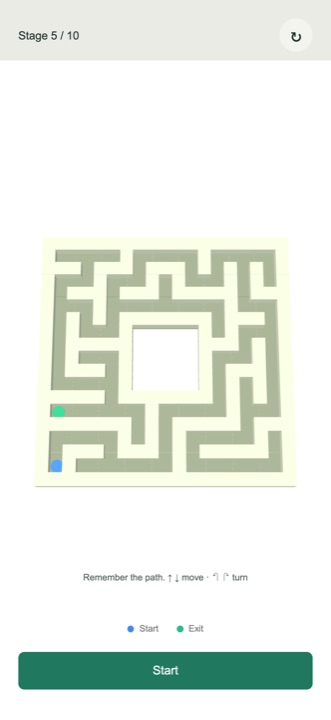
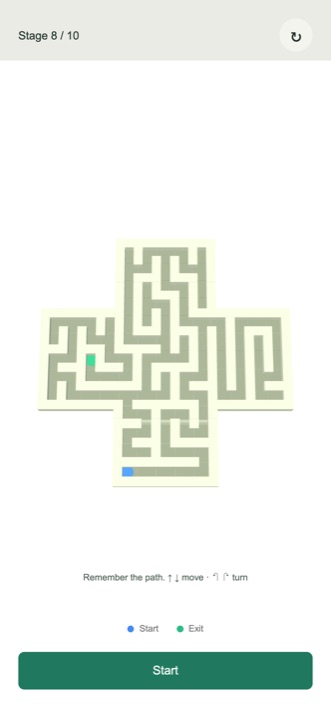
How a stage works
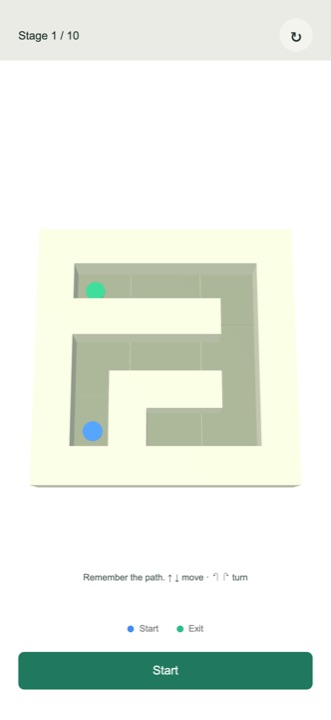
Each stage opens on a top down view of the whole maze. The blue dot is the start and the green dot is the exit. The timer does not run during this view, so take as long as you need to study the route.
Press Start and the camera flies down into the start room. From then on you see only the corridor in front of you. Reach the exit room and the camera pulls back up to the overview, now with the path you actually walked drawn on the floor, and the result shows your step count and time.
Clearing a stage unlocks the next one. After stage 10 the result offers a button to go back to stage 1.
Controls
The maze is a grid of rooms, and every move is exactly one room. Up moves one room forward and down moves one room back without turning around. Left and right turn you 90 degrees in place. On a keyboard, the arrow keys or W, A, S and D do the same, and Escape pauses.
If you try to walk into a wall, nothing moves and a short message tells you to try another direction. Bumping a wall does not cost a step. Turning does not cost a step either; only moving forward or back to a new room counts.
The 10 stages
Every stage is bigger than the one before, and the outline changes shape each time, so the overview itself is a clue to where you are. The start is always the leftmost room in the bottom row of the shape. The minimum steps below is the length of the shortest route from start to exit.
- Stage 1, square: 9 rooms, shortest route 6 steps
- Stage 2, tower: 24 rooms, 13 steps
- Stage 3, cross: 33 rooms, 18 steps
- Stage 4, diamond: 41 rooms, 23 steps
- Stage 5, square frame with an empty middle: 72 rooms, 40 steps
- Stage 6, corner shape: 85 rooms, 47 steps
- Stage 7, disc: 97 rooms, 53 steps
- Stage 8, big cross: 105 rooms, 58 steps
- Stage 9, donut: 116 rooms, 64 steps
- Stage 10, circle: 177 rooms, 97 steps
Two facts that make the mazes easier
Every maze is built so that there is exactly one route between any two rooms. There are no loops. That means any branch that is not on your route is a dead end, and if you take a wrong turn you can always walk straight back the way you came to the last junction and try the other way.
The exit is always the room farthest from the start along the corridors. It can look close on the overview, as on stage 5 where it sits just above the start, but the corridor route to it is always the longest walk in the maze. Do not trust straight line distance; trace the corridors.
Tips for memorizing a route
Trying to remember the whole picture rarely works past stage 4. Turn the route into a short list of instructions instead.
- Trace the route from the exit back to the start on the overview. Working backward from the goal makes the correct branch at each junction obvious.
- Write the route as turns, not distances, for example: right, left, left, right. Then only count rooms on long straight runs.
- Remember which way you face when you drop in. You start looking down the only open corridor next to the start room, which may not be up on the overview.
- Use the shape. On the cross, frame and donut stages, note which arm or side of the shape the exit is in, and head for that arm first.
- If you get lost, the pause menu has a restart button. It takes you back to the overview so you can look again, but it also resets your steps and timer.
- The back button moves you one room backward without turning, so you can step out of a dead end and keep facing the same way.
Replaying for a better score
Every stage saves your best step count and your best time separately, so a slow but perfect walk and a fast run with a wrong turn can each set a record. The stage menu marks every cleared stage with a check and shows how many of the 10 you have completed. A perfect walk matches the shortest route listed above, and each detour adds steps for walking in and walking back out. Progress is kept on your device.
Frequently asked questions
- Is there a time limit?
- No. The clock only runs while you walk inside the maze, and it is just a record. You can study the overview for as long as you like.
- Do turns count as steps?
- No. Only moving to a new room, forward or back, counts as a step. Turning and bumping into walls are free.
- Can I see the map again while walking?
- Not without starting over. Restart from the pause menu returns you to the overview, but your steps and time reset.
- How many stages are there?
- Ten. They grow from 9 rooms on stage 1 to 177 rooms on stage 10, and each new stage unlocks when you clear the one before.
- Are the mazes random?
- No. Each stage always has the same layout, so you can practice a stage and improve your best steps and time.
- Can I get stuck in a loop?
- No. Each maze has exactly one route between any two rooms, so walking back always leads to where you came from.